Launch timeline
Your loan officer website launch timeline: 5 business days.
Start today and your site goes live in 5 business days. Day 0 you send the basics, Day 1 we run the compliance pass, Day 2 we build, Day 3 you review, Day 4 we wire it up, Day 5 it launches.

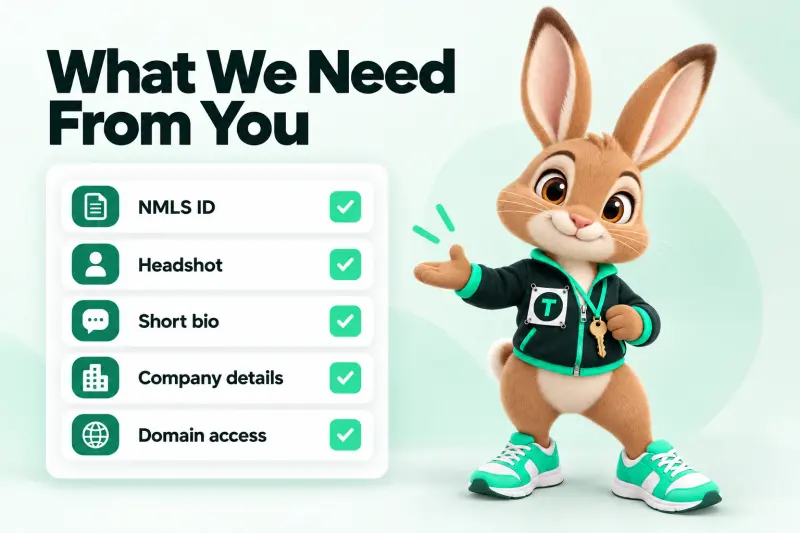
Day 0 checklist
What do you need to send to start?
Five things: your NMLS ID, your company's name and NMLS ID, the states you're licensed in, a headshot and a few lines about you. Domain access helps but isn't required on Day 0.
- NMLS ID
- Company name + company NMLS ID
- Licensed states
- Headshot
- Short bio or LinkedIn
- Domain login or registrar
No headshot yet? Send a phone photo against a plain wall — we'll swap it when your professional one arrives. The launch kit includes a headshot brief.
Day by day
What happens on each day of the launch?
Every day has an owner. Scroll the spine — each station lights up as you pass it.
Day 0 · You
Kickoff: you send the basics
You fill in the kickoff form: your NMLS ID, your company and its NMLS ID, licensed states, a headshot, a short bio and domain access. We confirm your launch date the same business day.
We do
- Confirm your launch date the same business day
- Open your project board and CRM inbox
- Check your domain situation
You do
- Fill in the kickoff form (about 20 minutes)
- Send a headshot — a recent phone photo is fine to start
- Tell us your company's marketing or compliance contact
You'll see
A confirmation with your launch date and a checklist of anything still missing.
Day 1 · Us
Compliance pass and copy
We verify your IDs on NMLS Consumer Access, draft your pages from our loan-officer page library, and run the checklist: NMLS lines, license wording, Equal Housing Opportunity, trigger terms, privacy notice.
We do
- Look up your NMLS ID and your company's on NMLS Consumer Access
- Draft your pages from our loan-officer page library
- Run the compliance checklist on every draft page
You do
- Nothing, unless we ask a question about your licenses
You'll see
A short message if something doesn't match (for example a license state that isn't active).
Day 2 · Us
Design and build
Your site is built on our fast static stack: home, about, loan programs, calculators, application, reviews and contact — with your colors, photo and voice. Schema, sitemap and llms.txt are generated as we go.
We do
- Design in your colors with your photo and voice
- Build home, about, loan programs, calculators, application, reviews and contact
- Generate schema, sitemap and llms.txt
You do
- Optional: answer a 5-question style quiz so the look feels like you
You'll see
Nothing yet — Day 2 is heads-down build.
Day 3 · You
Review day
You get a private preview link and a compliance packet (every disclosure, where it sits, and why). You and your company's compliance team mark changes. This is the step that most often sets the real pace.
We do
- Send a private preview link
- Send the compliance packet: every disclosure, where it sits, and the rule behind it
You do
- Click through the preview on your phone
- Forward the packet to your compliance or marketing team
- Mark changes in one list
You'll see
Your site, working, on a private link.
Day 4 · Us
Revisions and wiring
We make your changes (two rounds before launch), connect forms and the application to your CRM inbox, set up alerts, test every calculator and run speed checks on mobile.
We do
- Make your changes (round one, then round two if needed)
- Connect forms and the application to your CRM inbox and alerts
- Test every calculator, form and link on mobile and desktop
- Run speed checks
You do
- Approve the final version — a reply of "approved" is enough
You'll see
The final preview and a test lead in your inbox so you know alerts work.
Day 5 · Both
Launch day
Domain connected, SSL on, redirects live, sitemap submitted to search engines. You get your launch kit: links for your email signature, social bios and Google Business Profile, plus a 30-day tweak window.
We do
- Connect your domain and switch on SSL
- Turn on redirects from any old URLs
- Submit your sitemap to search engines
- Hand over your launch kit links
You do
- Join a 15-minute launch call (optional)
- Update your email signature and social bios with the new link
You'll see
Your site live on your domain, and a 30-day tweak window starting.
Standard or rush
Should you pay for a rush launch?
Only if your company approves marketing quickly and you have a hard date. Here's the honest difference.
| Standard | Rush | |
|---|---|---|
| Business days to launch | 5 | 3 |
| Price | Included in every plan | $149 one-time |
| Compliance pass | Full checklist | Full checklist (same day as build) |
| Revision rounds before launch | 2 | 2, same-day turnaround |
| Best for | Most new and switching LOs | Brokers and LOs with fast in-house approval |
| Depends on your company's review? | Yes | Yes — rush can't change that |
Being honest
What can slow a launch down?
Mostly things outside a website: your company's compliance queue, an NMLS record that hasn't updated yet, or a domain stuck in an old account. Here's how we handle each.
- 01
Compliance approval at your company
Many lenders require marketing review before any LO site goes live. We can't control their queue, so we send a tidy packet on Day 3 to make it quick.
- 02
Missing NMLS or license details
If your NMLS record isn't showing the company sponsorship yet, we wait for it rather than publish something that doesn't match.
- 03
Domain access
If your domain is locked in an old account (common after switching companies), transfer can take a few days. We can launch on a temporary address and move it later.
- 04
Rounds of changes beyond two
Two rounds before launch are included. Big rewrites after Day 4 move the date — small fixes can wait for the 30-day tweak window.

FAQ
Launch timeline questions
How long does it take to build a loan officer website?
With us, 5 business days from a complete kickoff form to launch. Business days are Monday to Friday, not counting US federal holidays. A custom agency build commonly takes weeks; a DIY builder takes as long as your evenings allow.
When does the clock start?
On the business day your kickoff form arrives with your NMLS ID, company details and a headshot. If something is missing, we tell you that day and the date moves only by the days it takes to arrive.
Do weekends count?
No. If you send everything on a Friday afternoon, Day 1 is Monday. The date shown at the top of this page already skips weekends and federal holidays.
What is rush launch?
Rush launch is 3 business days for $149 one-time one-time. A dedicated builder compresses build and wiring. It can't shorten your company's compliance review, so it works best for brokers and LOs whose company approves quickly.
What is in the compliance packet?
A one-page list of every disclosure on your site — NMLS IDs, license lines, Equal Housing Opportunity, privacy links, calculator disclaimers — with where it appears and the rule it relates to. Compliance teams can approve faster when they don't have to hunt.
How many revision rounds do I get?
2 rounds before launch, and then a 30-day tweak window after launch for smaller changes.
What if my compliance team takes a week?
Then launch waits for them — we never publish an LO site without the approval your company requires. The launch-date promise covers delays on our side, not your company's review queue.
What happens on launch day?
We connect your domain, switch on SSL, turn on redirects, submit your sitemap, send a test lead to your inbox and hand you the links for your email signature, social bios and Google Business Profile.
What if we miss the date?
If we miss the launch date we confirmed and the delay is on our side, your first month is free. Terms are on the refund policy.
Can I start before my new company start date?
Yes — we can build in advance and keep the site private until your start date, then switch on the right company and NMLS lines the morning you start. See switching companies.
Launch day in 5 business days
Put launch day on your calendar.
Send the kickoff form today and we'll confirm the exact date by the end of the business day.
No payment on the form · Monthly plans cancel any time · Reply within 4 business hours